
Home › Forums › Digital UV Printing Hub › A Comprehensive Guide to UV-DTF Cup Wrap Printing
Tagged: UV DTF, UV DTF Printing
- This topic is empty.
-
AuthorPosts
-
19 January 2026 at 8:06 pm #843
Dowinsss
KeymasterA Comprehensive Guide to UV-DTF Cup Wrap Printing
Custom printed drinkware — from tumblers to mugs and travel bottles — remains one of the most popular personalized products in the print-on-demand and promotional merchandise markets. Traditional decoration methods like vinyl wraps, heat transfer, and screen printing each have limitations: vinyl can peel over time, sublimation works only on coated substrates, and screen printing is messy and inefficient for detailed or high-volume jobs. In contrast, UV-DTF (ultraviolet direct-to-film) printing has become a leading solution for producing durable, vibrant cup wraps that rival factory finishes without requiring industrial infrastructure.
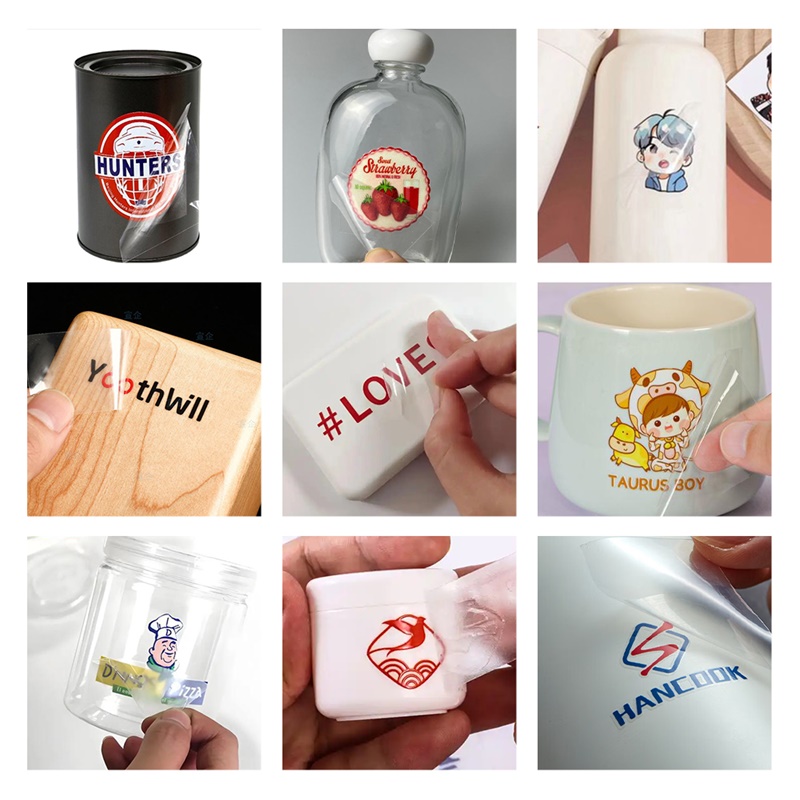
What Is UV-DTF Printing?
UV-DTF is a hybrid print transfer process that uses ultraviolet-curable inks printed onto a flexible film. Under UV light, these inks instantly harden, creating a fully cured graphic right off the printer. A second adhesive film is then laminated to the printed surface, creating a transfer that can be applied to a prepared cup or tumbler surface without heat pressing. When applied correctly, the result is a highly detailed, color-rich wrap that bonds directly to the cup surface.
Unlike traditional vinyl decals, UV-DTF wraps can reproduce complex gradients, photographic imagery, and full-color artwork with excellent durability and resistance to abrasion, water exposure, and sunlight fading.
Why UV-DTF Is Gaining Traction in Drinkware Decoration
Instant Curing Saves Time
Because UV inks cure instantly under UV LED light, there’s no drying time, which dramatically speeds up production throughput. This efficiency is an advantage both for small studios and larger shops scaling up output.
Adaptability to Multiple Materials
UV-DTF wraps can adhere to a range of surfaces — including stainless steel, plastic, glass, and coated metal — without needing a heat press or special coatings. This flexibility contrasts with sublimation, which requires compatible substrates.
Strong, Durable Results
The cured ink layer forms a hard, scratch-resistant surface that holds up well against typical use. Many operators report good wash durability, though like all ink transfers, care instructions matter (e.g., handwashing recommended to extend life, microwave use may degrade ink over time).
Essential Supplies
A basic UV-DTF setup revolves around the following components:
-
UV-DTF Printable Film (A-film): A specially coated film designed to accept UV curable inks.
-
Adhesive Film (B-film): Laminated over the printed design to embed the adhesive layer that bonds the film to the target surface.
-
Design Software: Tools such as vector or raster graphics programs to create and size your artwork accurately.
-
UV Flatbed Printer: The core device that lays down the CMYK, white underbase, and optional gloss layers with UV curing.
-
Application Tools: Cold laminator or hand roller to marry A and B films, and a squeegee/credit card for applying the wrap to the cup surface.
Step-by-Step Workflow
1. Prepare Your Design
Begin with accurate measurements for your cup size (e.g., 20 oz, 30 oz). Extend artwork slightly beyond trim lines (a bleed) to avoid white edges showing after application. Layer your file with full-color (CMYK), a white underbase for opacity on dark surfaces, and (optionally) a gloss layer for enhanced shine.
2. Print to Film
Load the UV-DTF printable film into the UV printer and print the artwork. The printer cures each ink layer instantly with built-in UV LEDs, locking in bold colors and sharp edges.
3. Laminate Adhesive Film
After the print is fully cured and cool, laminate the adhesive film (B-film) over the printed side using even pressure. This step embeds the adhesive into the ink layers.
4. Apply to the Cup
Align the wrap carefully on the cup and smooth from center outward to remove bubbles. Peel away the clear carrier and finish by pressing to ensure a firm bond.
Note: Proper surface cleaning (free of oils or dust) is essential for good adhesion.
Tips for Professional Results
-
White Underbase Is Crucial: Especially on dark or metallic surfaces, an opaque white layer enhances color vibrancy and prevents color washout.
-
Gloss Coating Offers Visual Depth: An optional gloss layer simulates resin or epoxy finishes without messy post-application coatings.
-
Test Print on Paper First: This reduces waste and ensures correct sizing before using expensive film.
-
Climate Control: Keep films in a cool, dry environment to preserve adhesive performance.
-
Use Jigs for Bulk Work: Simple holding fixtures improve speed and consistency for multiple cups.
Market and Business Context
UV-DTF cup wraps sit at the intersection of customization demand and efficient digital production. Contemporary consumers increasingly seek unique, personalized products, and platforms like e-commerce marketplaces have expanded reach for small print businesses.
Compared to vinyl decals, UV-DTF offers higher perceived quality and longevity, which supports premium pricing. Typical material costs for a wrap remain low, while finished products often retail at multiples of their production cost, enabling attractive margins for makers and small brands.
In broader industry terms, UV-DTF demonstrates how digital print technologies — once confined to flat surfaces — are evolving to handle curved, complex shapes with minimal tooling. This trend mirrors other digitization shifts in textile and large-format printing where automation and faster curing processes reduce lead times and waste.
Final Perspective
UV-DTF cup wrap printing is more than a fad: it represents a technological shift toward efficient, high-quality, versatile decoration across varied substrates. Whether for hobbyists scaling into business or established print shops diversifying their portfolio, mastering UV-DTF equips operators to deliver professional drinkware with durability and visual impact that older methods struggle to match.
-
-
AuthorPosts
- You must be logged in to reply to this topic.